In this final installment I’ll be examining Libib.com and offering some advice on which tool I recommend overall to manage your home library. Let’s start things off with an overview of Libib.
Just like Goodreads and LibraryThing, Libib offers users a way to simply catalog their home libraries for free. The two elements that make Libib rise above either of the previously mentioned tools is its design and ease of use.
Personally, I found the look of Libib more appealing than either Goodreads or LibraryThing, and its simple interface makes adding books fast and easy.
Libib has all the features you’d expect from a home book cataloging tool: Catalog you home library (books, movies, & video games) for free.
Companion app available for Android and iOS
Publish your collections on a personal page
Import your collect using a .CSV file
Keep notes and tag books in your library
Libib really focuses on simplicity and ease of use. Scanning books into Libib with an app is quick and easy. I effortlessly scanned 6 books into Libib in about 1 minute. I didn’t have to confirm the title of the books or go through any extra steps. I just scanned the UPC code and they were added and I was prompted to add another or stop scanning. Although the process was fast, the lack of confirmation left me questioning whether or not the books had even been added, and upon reviewing my library I found one was missing (I had scanned 7 books). It was easy enough to add it via an ISBN search. The app does indicate if the book was successfully added, but the message is small and easy to overlook and doesn’t appear different than the successfully matched message except for the text.
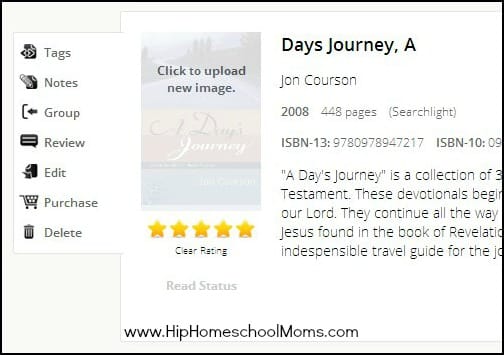
Common tasks are easily accessed by hovering your mouse over the book’s cover image. From there you get a pop-up with many of the features available in most common home library software. You can rate, review, group, and tag books. Even editing a book’s description can be done without having to go to a new page. This makes maintaining your library very simple and easy to accomplish. This simple design is what I think gives it a leg up on Goodreads and LibraryThing. It’s not cluttered, and you’re not distracted by feeds and updates from other users.
So which is the best? Honestly, it depends on what you’re looking for. If you want a simple, easy-to-use, and attractive tool, go with Libib. Want to share your reviews and updates and make friends related to the books you read? Goodreads will be your best bet. If you have a small library and want to avoid the Amazon ecosystem but don’t mind paying for for added space, the best choice is LibraryThing. You really can’t go wrong with any of these products.
Which is your favorite and why? Share your thoughts in the comments.
John Wilkerson has been married to Lisa for 15 years, and they have 7 children. All of them are homeschooled and keep them busy but very happy. When he’s not solving technical problems at a local private college during the day or podcasting and blogging at night, John likes to pursue his other current “hobbies” which include social media, martial arts, and coaching soccer. If you’d like to connect with John online visit the contact page on his website, The Wired Homeschool.
6 Realistic Tips for Tackling Clutter Do you struggle with clutter? I’m willing to bet that most of us with kids and pets don’t have a home that looks like a magazine shoot all the time, even if we try to keep it clean. After all, clean and tidy aren’t always the same thing. Sometimes…
One thing I do to make mealtimes a bit easier for our large homeschooling family is to make freezer meals. I even do this with some of our breakfast recipes. On a monthly basis we will usually make pancakes, waffles, and muffins to freeze so we have them on hand for the entire month. Chocolate…
Got a big mess of art stuff and not sure how to go about getting from disaster to sanity? I used these five steps to organize homeschool art supplies in my very small living space. I hope they can help you too! Looking for resources on how to teach art in your homeschool, art project ideas or…
These Crockpot Salsa Chicken Tacos made in the crockpot are so simple to make, I’m almost embarrassed to call them a recipe. This effortless meal is the perfect thing to make on those days that you don’t even have time to gather your thoughts. In your crockpot, place about 2 pounds of boneless, skinless chicken. You…
We’ve all been there. You’ve spent the day diagramming sentences and building working, scale model trebuchets with the kids, and you look up to realize it’s almost time for supper and you have no idea what to make! The kids look at you with hunger in their eyes, and you look back with panic in…
It is surprisingly easy to make cheese crackers. My children enjoy the process (they can really get their hands into it!) and the crackers disappear almost as soon as they get out of the oven! And the smell in the house? Mmmmmmm! Even though you can use a pastry cutter to combine the ingredients, it…
3 Comments
Hello! I am a homeschooling mom of two. We are part of a coop and I have volunteered to help organize and set up a library system for our small library. Do you think Libib may be a good fit for us? We would like to use a scanner as well to make the whole process of checking out books easier. Thanks!
Hi Danelle! I messaged the writer of this post (John Wilkerson wrote this for us as a guest post) to ask if he can answer your question. 🙂 Check back in a few days to see if he’s been able to reply. Thanks for your question!
What you want is Libib Pro. The pro version has a lending system that includes a simple patron management system. In addition, there is a “kiosk mode” that you can use so that people can walk up and check out books automatically. You can find out more about the pro version here:
If you don’t want to pay the $60/year you could use the standard version and tag a book if it has been checked out, however, you’d have to come up with a way to figure out when that happened and when the item is due.
Hope this helps. If you have any specific questions about the product, your best bet would be to contact Libib directly.














Hello! I am a homeschooling mom of two. We are part of a coop and I have volunteered to help organize and set up a library system for our small library. Do you think Libib may be a good fit for us? We would like to use a scanner as well to make the whole process of checking out books easier. Thanks!
Hi Danelle! I messaged the writer of this post (John Wilkerson wrote this for us as a guest post) to ask if he can answer your question. 🙂 Check back in a few days to see if he’s been able to reply. Thanks for your question!
What you want is Libib Pro. The pro version has a lending system that includes a simple patron management system. In addition, there is a “kiosk mode” that you can use so that people can walk up and check out books automatically. You can find out more about the pro version here:
https://www.libib.com/pricing
If you don’t want to pay the $60/year you could use the standard version and tag a book if it has been checked out, however, you’d have to come up with a way to figure out when that happened and when the item is due.
Hope this helps. If you have any specific questions about the product, your best bet would be to contact Libib directly.
Cheers,
John