I grew up in a generation that was just realizing the endless potential of computers and the internet. It’s one of the only areas where people in my age group just flew by leaps and bounds ahead of our parents and grandparents. But being a parent in my late 20’s has brought a new set of challenges to our homeschool.
My kids know nothing of a non-electronic lifestyle. All phones travel with you and offer endless ways to entertain, all cameras are digital, all TV’s are supposed to have hundreds of channels of programming available at all times, and most families have at least two computers in the home. The struggle for me has been how to really utilize all the benefits of this technological age we live in while still protecting my boys from the wasteland that can be accessed through those same advances. I am being 100% honest when I tell you how thrilled I was with the opportunity to review a product that offers a myriad of solutions to my concerns along with literally countless possibilities to take advantage of all computers have to offer!
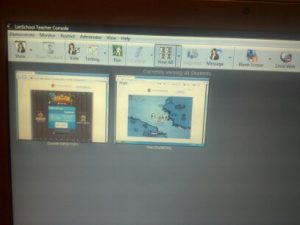
LanSchool is a management software that gives teachers and homeschool moms the ability to monitor, teach and communicate through their teacher console with the student computers in their ‘classroom’. My oldest boy is the only one in our family that does a decent amount of work on his computer; he and I have had a lot of fun using this program and making it work for us!
Each morning, before our full school day begins, you can find me here at my kitchen table, drinking too much coffee and reading a few pages of some book. My 9 & 7 year olds can be found downstairs getting started on their math work. I have a contentious relationship with math so this year we switched to an all-computer based, not-mom-taught, math program. However, my boy does still have trouble from time to time and I like to know what he’s working on so we can look for real-life ways to reinforce the skills he’s learning. LanSchool has given me the ability to open my laptop and keep tabs on what he’s working on. When he runs into trouble or has questions I’m able to click a button on the teacher console to control his screen or show him something on mine as well as have the option to switch on microphones on both computers so I can give him any help he might need.
The possibilities for ways to use this program really are endless. There’s a way to create and administer tests, take polls, ask questions and teach lessons all from your own computer. We didn’t really get a chance to use these features but the whole console is easy to navigate and extremely user friendly.
Because my children are younger, a lot of their computer usage comes in the form of web-based games. My absolute favorite thing about LanSchool is the ability to monitor what sites they’re on, manage where they’re allowed to go, and control how much time they spend playing.
I love that I can send them a message when their time is up, or even completely blank out the screens on the student computers. We have fun passing notes back and forth, and I’ve even used the option to control a student computer screen to shut down the downstairs computer from upstairs on my laptop. You should have heard the giggles the first time I sent them a message. They think LanSchool is one of the coolest things!
Check out the LanSchool website for a more complete list of features, & specifications, there really are so many things this program can do. I was also impressed with the long list of video tutorials available! If your kids spend a good amount of time doing their schoolwork on computers or you’re looking for a solid way to monitor their usage, you really cannot go wrong with LanSchool!
Lanschool Giveaway
One Hip Homeschool Moms reader will win a one-year license to Lanschool v7.6 ($199 value)! This monitoring software works with PCs, Macs, Thin Clients, iPads, and Linux.
Danielle is a big-city Southern California girl who, after a number of years spent enjoying the majesty of small-town Montana, moved back home to be near family and make a go of her backyard homesteading dreams. She’s married to her stud of a high school sweetheart and together they’re raising three handsome, rough-and-tumble young men. Their family loves the Lord and homeschooling is just one of the many ways they have endeavored to give their whole lives to Christ. Danielle and her family are having a blast working to turn their healthy DIY spirit into a more self-sufficient lifestyle.
If you are a mom who’s considering homeschooling, this series of posts is for you! The first post in this series talked about the need to learn about your state’s homeschool laws and how to do that. When I talk to moms who are thinking about homeschooling, I always tell them the first thing they need…
Welcome to the Hip Homeschool Hop! Look at us, all on time and such! Is everyone having an awesome week so far?? Looking for homeschool supplies/books at a great price? Have something you’re not using and would like to sell? Visit our Hip List! Now, on to the HOP… Don’t forget to grab…
I hope this Case Against Full Day Kindergarten series (you can read Part 1 here) leads you to do what is best for your child, where today’s lines are blurred between publicly funded daycare and education. This post is second in a two part series : The Case Against Full Day Kindergarten. Part 1 discussed how Kindergarten has…
Welcome to the Hip Homeschool Hop! Thank you for linking up with us on our Hip Homeschool Hop! We’re glad to have you. And if you’re here to take a look around and find some fun topics, good information, ideas, or support, we’re glad to have you too! But first we hope you’ll take a…
For homeschooling families, a day away from home at co-op classes can be both rewarding and exhausting. Preparation is key to making the day smooth. As a homeschool veteran of 16 years, I’d say I have a bit of experience, and I’m dying to share it with you! Whether you’re teaching or assisting in classes,…
Welcome to the Hip Homeschool Hop! Thank you for linking up with us on our Hip Homeschool Hop! We’re glad to have you. And if you’re here to take a look around and find some fun topics, good information, ideas, or support, we’re glad to have you too! Enjoy! Guidelines for the hop: You can…
14 Comments
Danielle,
Thanks for the great review! Although my children do not currently do much school work on the computer, I have many friends who have children that do. I am going to send them the link to this review as I know they could benefit. Thanks for sharing!
Wow, this is a really interesting way to keep up with everything without constantly looking over their shoulder. It would be real easy to help with any of the things she is having problems with on the computer. I really like this idea.
We will be getting my daughter her own computer for next school year. I would love to be able to monitor her closely w/o hovering.. the messaging fewature will be awesome too!
Oh, my goodness. This is what I need. I have 4 boys that are very tech savvy. I do daycare and my oldest needs to learn more independently. But, he’ll be a fourth grader this year and he’s the kind of boy that still needs mom to keep him on track and help. This may be the ticket.
My two older children do lots of their school work on their computers. I’d love to have this to be able to keep tabs on them! I love all of the different features this includes! Wow!
Oh my gosh, this excites me! I absolutely love technology, and we use it quite a bit in our homeschool. I just did a post on how I use Dropbox in our homeschool. 🙂 Thanks so much for the great review and the opportunity to win!















Danielle,
Thanks for the great review! Although my children do not currently do much school work on the computer, I have many friends who have children that do. I am going to send them the link to this review as I know they could benefit. Thanks for sharing!
🙂
Very good program.Great offer.Thanks a lot.
Wow, this is a really interesting way to keep up with everything without constantly looking over their shoulder. It would be real easy to help with any of the things she is having problems with on the computer. I really like this idea.
We really liked it for the same reasons, good luck!!
I would love to use it for my daughter!
I would use lanschool, as my oldest is 12. thanks for making it known there are programs like this out there.
We will be getting my daughter her own computer for next school year. I would love to be able to monitor her closely w/o hovering.. the messaging fewature will be awesome too!
awsome
This looks amazing! I am a new homeschool mom and always looking for ways to improve my system.
Oh, my goodness. This is what I need. I have 4 boys that are very tech savvy. I do daycare and my oldest needs to learn more independently. But, he’ll be a fourth grader this year and he’s the kind of boy that still needs mom to keep him on track and help. This may be the ticket.
My two older children do lots of their school work on their computers. I’d love to have this to be able to keep tabs on them! I love all of the different features this includes! Wow!
Oh my gosh, this excites me! I absolutely love technology, and we use it quite a bit in our homeschool. I just did a post on how I use Dropbox in our homeschool. 🙂 Thanks so much for the great review and the opportunity to win!
Absolutely Awesome Giveaway!!!